This section is where you can clearly view the information from
the Data Panel. Two important features in the View Panel are:
Print Full Program/Plan Report: Clicking this button will
generate a screen output report that includes all the elements
of a Program/Plan. This can be saved as a PDF file, or printed
in hard copy.
Custom Report for this Program/Plan: Clicking this button
will bring up the report screen, while you are in the Data
Entry/Inquiry screen, to allow you to custom define a report
without closing out of the Data Entry/Inquiry screen.
There are 14 forms with information fields that your
organization can define, allowing you to view the information
you need. Some fields could include:
Project/Plan ID: A unique serial number is assigned to each
Project Plan to provide a distinct reference.
Title: Each Project/Plan will have a title that summarizes what
it is about.
Description: This is a brief statement describing the
Project/Plan.
Start and End Dates: Crucial information for determining what
Projects/Plans are called up in reports. This indicates when
the Plan is expected to begin. Start and end dates are crucial,
because they determine which Plans are called up for country
program reports.
End Date: This indicates when the Plan is expected to finish.
Start and end dates are crucial, because they determine which
Plans are called up for country
Status: The drop-down box allows you to choose the status
of the Project/Plan. This will change as the Project/Plan gets
implemented and should be updated as the status changes, as
it will facilitate searches for Projects/Plans in different
categories.
Only a few suggestions
for how you can track
the details that make
your work more
effective!


 Learn more about Integral Design Software, the makers of PlanWin | Contact Us | About Us
Copyright © 2009 by Integral Design Software, LLC - All Rights Reserved
Learn more about Integral Design Software, the makers of PlanWin | Contact Us | About Us
Copyright © 2009 by Integral Design Software, LLC - All Rights Reserved
 Made with Xara

 Directory
Panel
Queries and
Reports
Directory
Panel
Queries and
Reports




 PlanWin Success
The Tree Structure
provides flexibility to help
you decide what makes
sense for your
organization.
PlanWin Success
The Tree Structure
provides flexibility to help
you decide what makes
sense for your
organization.


















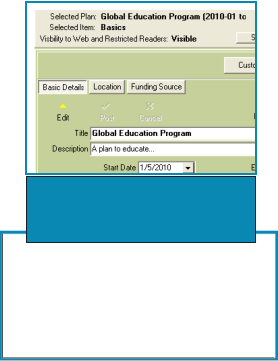 The right-hand panel
contains the forms that helps
make monitoring your work
more effective.
The View
Panel
The right-hand panel
contains the forms that helps
make monitoring your work
more effective.
The View
Panel



















Learn more about Integral Design Software, the makers of PlanWin | Contact Us | About Us
Copyright © 2009 by Integral Design Software, LLC - All Rights Reserved
Made with Xara
Directory
Panel
Queries and
Reports
PlanWin Success
The Tree Structure
provides flexibility to help
you decide what makes
sense for your
organization.
The right-hand panel
contains the forms that helps
make monitoring your work
more effective.
The View
Panel